 Rancho
Analyze Real Estate Cashflow in One Click
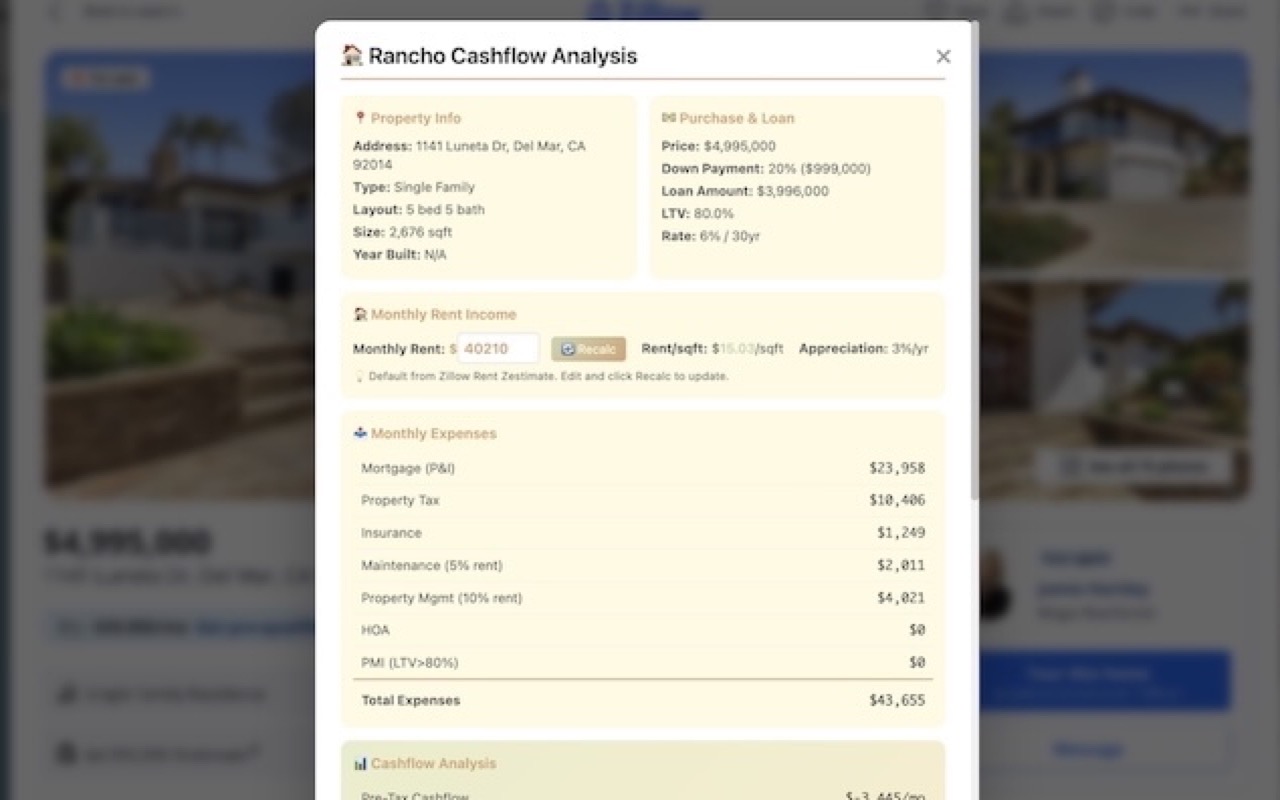
Instantly calculate rental property returns on Zillow. Get mortgage breakdown, expenses, APY, and sync to Notion - all without leaving the page.
 Rancho
Instantly calculate rental property returns on Zillow. Get mortgage breakdown, expenses, APY, and sync to Notion - all without leaving the page.
Analyze any Zillow listing instantly. No copy-paste, no spreadsheets, no manual calculations.
See mortgage, taxes, insurance, PMI, maintenance, and property management all in one view.
Get Cash-on-Cash APY, Cap Rate, and 5-year returns with appreciation factored in.
Save properties to your Notion database with one click for easy comparison and tracking.
Adjust down payment, interest rate, tax rates, and all other parameters to match your situation.
Override rent estimates and instantly recalculate all metrics with your own numbers.
Open any property detail page on Zillow
Hit the Rancho button in the bottom-right corner
Get instant cashflow analysis with all the numbers
One click to save to your property database